§17 · Using the module
For the Fleuva Super Admin
Open Tenants Fleuva (/tenancy/admin).
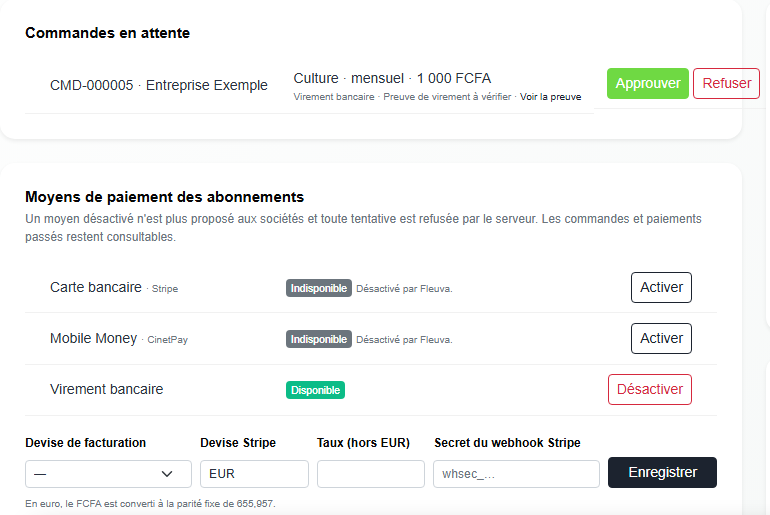 Super Admin orders and payment methods
Processing an order: Pending orders shows the company, item, amount, method and payment state. Voir la preuve (view proof) opens the document. Approve activates the plan or module; Refuse closes the order. By card or Mobile Money, Approve is refused until the provider has confirmed payment. By transfer, check the proof first: approval activates the subscription, it confirms no payment.
Renewals: those of the last 30 days, with refused charges flagged (reason, attempt number).
Enable / Disable a payment method: applies to every company; a disabled method is refused by the server.
Card, conditions: · XAF or XOF billing currency chosen in the panel; · STRIPE_PUBLISHABLE_KEY, STRIPE_SECRET_KEY and STRIPE_WEBHOOK_SECRET in the production .env; · Stripe currency EUR (fixed parity), or another currency with its rate; · webhook URL declared at Stripe; · method enabled with Enable.
Mobile Money: CINETPAY_API_KEY, CINETPAY_SITE_ID and CINETPAY_SECRET_KEY in the .env, notification URL declared at CinetPay, then Enable.
Orange Money and MTN MoMo (PayNote), in the Super Admin Paiements (payments) menu: · MOBILE_MONEY_ORANGE_ENABLED / MOBILE_MONEY_MTN_ENABLED=true in the .env, then php artisan config:clear and php artisan route:clear. · PayNote credentials entered under Paiements › Identifiants PayNote. They are encrypted and override the .env. · Tester la connexion (test connection), then Proposer aux sociétés (offer to companies).
The billing currency must be XAF. Only companies established in Cameroon see these methods. Paiements lists every company payment (filters by purpose, method, status, company): - Revérifier (re-check) asks the operator; - Relancer la livraison (retry fulfilment) retries the activation of a payment received but not delivered. You are also notified.
Manual check: docs/payments/mobile-money/sandbox-check.md.
Block start-up if a key is missing: PAYMENTS_ENFORCE_CONFIG=true in the production .env, once every key is in place.
Online payment activation: by default, a verified Orange Money or MTN MoMo payment activates the order at once, while a card or CinetPay payment waits for Approuver. With FTA_ACTIVATE_VERIFIED_ONLINE_PAYMENTS=true in the .env, every verified online payment activates the order at once; bank transfers and quotes still wait for approval.
Fleuva AI › Providers: the monthly USD caps are a platform safety ceiling (Fleuva's margin, abuse), not a limit sold to companies. You are alerted at 80 %, 95 % and when a company reaches it; the company only sees a neutral message, with no amount. A share (20 % by default) of the Executive ceiling is kept for the weekly briefs.
Fleuva AI › Data protection: retention periods of AI data (conversations, Executive messages, raw WhatsApp messages, delivery logs; 7 days minimum), applied every night by ai:retention:prune; versions in force of the legal texts and number of acceptances; export and deletion requests made by companies. A grant by the super admin (Activation) needs no acceptance; the company accepts at its first order.
On-quote order: it arrives as Devis à chiffrer (quote to price), without an Approuver button. Enter the VAT-inclusive amount (and a note), then Chiffrer (price it): the company can then pay it, and you approve it like any other.
Plans and add-ons (/plans, two tabs):
Forfaits (plans): create or edit a plan. You set: · the default period, the monthly price and the yearly price, entered separately; an empty yearly price defaults to monthly × 10; · the included quotas: users, Fleuva AI requests per month, Executive seats ("-1" = unlimited); · storage, options; · the free trial (paid plan): Essai gratuit switch and Jours d'essai (trial days, required when the trial is on). The company starts it from its Abonnement page, once; · the included modules: every catalogue module, sector add-ons included. A module that requires another is refused on its own.
Removing a module from a plan cuts its subscribers' access on save; their data is kept. The form shows how many companies are affected.
The Proposé aux entreprises (offered to companies) switch hides a plan, including the free plan that cannot be deleted. A hidden plan is no longer offered or orderable; its subscribers keep and renew it.
Catalogue des add-ons: for each module, monthly and yearly price, Sur devis, Proposé à l'achat (offered for purchase), plans that already include it. Modifier opens its card: name, subtitle, description, icon. A module included in a plan can still be sold to companies whose plan does not include it. The État (status) column says who it is sold to (Vendu en add-on, with the plans concerned), or why it isn't: Sans prix : non vendu (no price), Non proposé à l'achat (not offered), Inclus dans tous les forfaits : rien à vendre (included in every plan). To sell accounting to Starter subscribers: untick it in the Starter plan, then set its price here. Plans are monthly or yearly; a plan priced at 0 is free and has no end date.
Subscription settings (card in Tenants Fleuva):
monthly and yearly prices of the options (subdomain, dedicated database, Fleuva AI, Executive, Workspace); the plans that include an option are ticked in Fonctionnalités par forfait (features per plan; on this update, every existing plan received Workspace);
price of one extra unit of each quota (0 = not sold) and size of a Fleuva AI request pack;
Fleuva Executive fair use: WhatsApp questions and directives per seat and month (0 = no ceiling; briefs and alerts are not counted);
Facturer automatiquement les utilisateurs au-delà du forfait (bill users beyond the plan automatically): creation is no longer blocked at the quota and each renewal of a paid plan bills the extra active users at the unit price above (off by default; without a unit price or on a free plan, creation stays blocked);
grace period, plan for new sign-ups, and the expiry rule (fall back to a plan or suspend the workspace);
a reminder of the issuer and VAT rate, set in Facturation (below).
Facturation (billing, super admin menu): what appears on every subscription invoice and receipt.
Invoice logo (PNG or JPG, 1 MB at most), to replace or remove;
issuing company: company name, legal form and capital, tax ID (NIU / NIF), RCCM, address, city, country, phone, e-mail, website;
payment and notices: bank details (by default, those of bank-transfer payment), mobile money number, payment terms in days (invoice due date), VAT rate, footer notices. Prices are VAT-inclusive: VAT is only broken down on the documents;
Envoi par e-mail (e-mail delivery): "Votre reçu" on each confirmed payment, "Votre facture" for a bank-transfer order (each can be turned off), optional blind copy to accounting. Approving a bank-transfer order records its payment and sends the receipt;
Aperçu d'une facture (invoice preview): a sample PDF to check the layout;
Dernières factures (latest invoices): invoice and receipt of each recent order.
As soon as a Fleuva AI or Executive option has a price, a yellow box flags what would bill it wrongly or make it unprofitable: a 0 % VAT rate, or an offered plan whose Fleuva AI requests or Executive seats are unlimited ("-1"). Nothing is blocked: fix the rate here and the quotas in Plans.
A company's subscription (Companies › the company's menu › Abonnement):
the company's plan, due date, add-ons, quotas and orders;
assign a plan, hidden ones included, with a due date and a reason; change the due date (empty = no due date);
assign an add-on or extra units; for each: change the due date or quantity, Résilier (cancel), Reprendre (resume), Retirer (remove);
every assignment creates an Offert order, visible to the company and recorded in the audit log.
Coupons: the company enters the code in its cart or when changing plan. The percentage discount applies to the paid plan and add-ons of the order, within the coupon's usage limit. Never on a quote, an option or a renewal.
Plan matrix: php artisan plans:apply-matrix applies config/plan_matrix.php (dry run without --apply), with the same rule as the screen.